To check Banglarbhumi Khatian and Plot Information, open the official Banglarbhumi portal and choose Know Your Property. Select the district, block and mouza, choose Khatian or Plot search, enter the matching number, complete the displayed CAPTCHA and view the available record. Sign in if the current portal flow asks you to.
Start from the official Banglarbhumi portal. This independent guide explains the search; official records and document requests are handled on the government website. For other services, see our Banglarbhumi land records guide.
Which search should you use?
| What you have | Search to choose |
|---|---|
| A Khatian number from your land papers | Search by Khatian for the selected mouza |
| A plot or Dag number | Search by Plot for the selected mouza |
| Both Khatian and plot numbers | Run each relevant search separately and compare the returned details |
| Only an old RS plot reference | Check the available RS–LR relationship before assuming it is the current plot number |
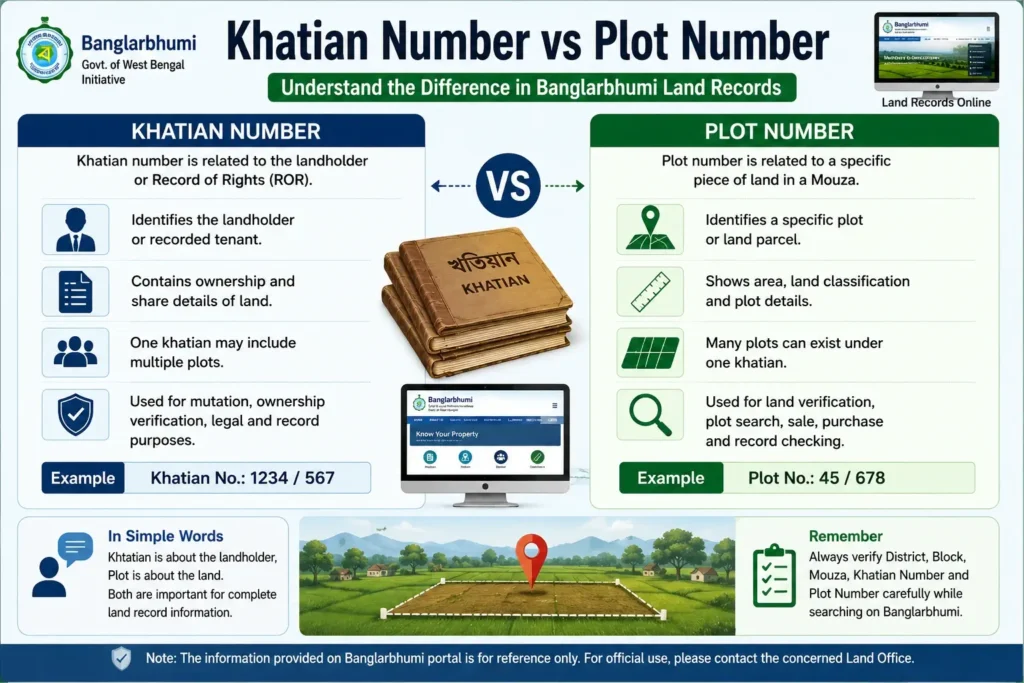
Khatian number, plot number and mouza: the difference
A Khatian is associated with a Record of Rights entry and recorded landholder or tenant details. A plot or Dag number identifies a land parcel within a mouza. One Khatian may contain information connected with more than one plot; the two numbers are not interchangeable.
The mouza identifies the land-record location within the selected district and block. A matching number in a different mouza is not enough to identify your property. Use the location on your land papers rather than choosing a similar-sounding mouza.
Details to keep ready before searching
- District, block and mouza from the land document.
- The Khatian number or plot/Dag number, with any parts of the reference copied accurately.
- Existing land papers so you can compare the returned entry.
- Both old and current plot references, if your papers contain different settlement numbers.
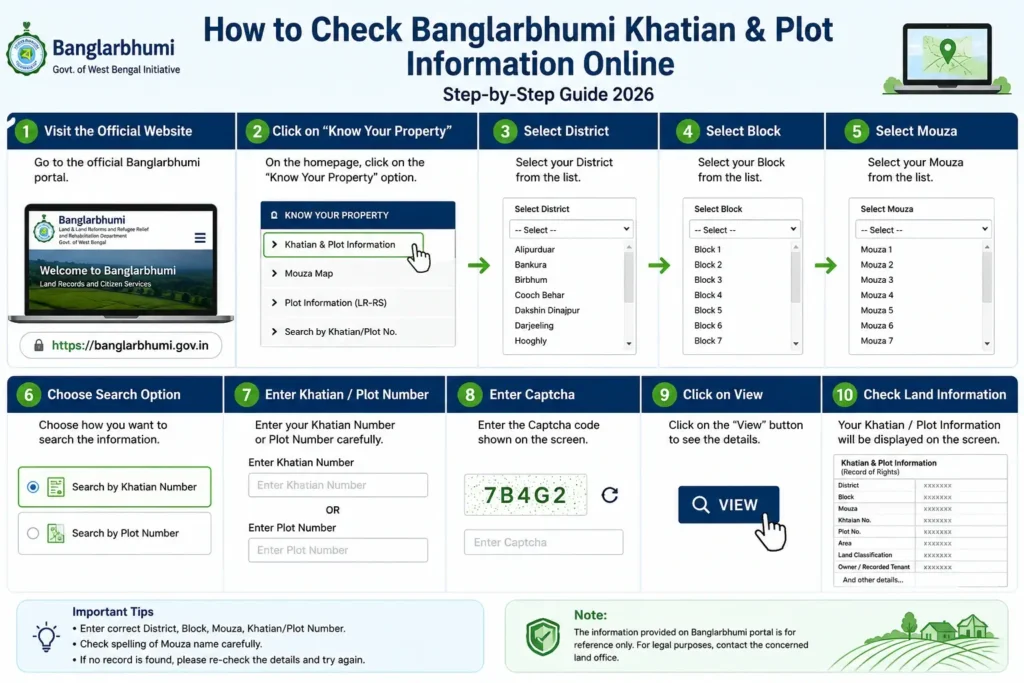
How to check Khatian information
- Open the official portal and choose Know Your Property. Complete sign-in if prompted.
- Select the district, then the block and mouza for the land.
- Choose the Khatian search option.
- Enter the Khatian number and any additional fields shown for that search.
- Complete the current CAPTCHA and select View or the search button displayed.
- Compare the returned location, Khatian number and available landholder or plot details with your papers.
How to check plot information
- Open Know Your Property on the official portal.
- Choose the correct district, block and mouza.
- Select the Plot search option rather than the Khatian option.
- Enter the plot/Dag number and any further fields requested.
- Complete the displayed CAPTCHA and submit the search.
- Check that the returned plot number and location match your document before comparing area or other record details.
You can start with either number: use the search type that matches the reference you have. Do not enter a Khatian number in the plot field simply because the two numbers look similar.
What to check after the result appears
The fields available depend on the record. Compare the following details where they are shown:
- Location: district, block and mouza must match the land you intended to search.
- Record number: confirm the Khatian or plot number, including any additional parts shown.
- Recorded name: compare landholder or tenant details with the relevant papers.
- Area and share: check the displayed unit and whether the figure describes the whole plot or a recorded share before comparing values.
- Land classification: compare the recorded description with your papers; do not assume it permits a proposed change of use.
- Linked details: where shown, compare the related plot or Khatian reference as well.
For example, finding the same plot number in a different mouza does not confirm that you found the correct land. Check the location first. Note the search type, location and number you used so you can repeat the lookup or explain a mismatch.
No record found or incorrect details: what to do
- Recheck location first: select the district, block and mouza again from your papers.
- Confirm the search type: Khatian and Plot are separate choices. Enter the reference in the correct field.
- Check the number: compare each part with the original document instead of guessing another number.
- Refresh a failed CAPTCHA: use the newly displayed code. If the session expired, reopen the service from the official homepage.
- Check old versus current references: if your document uses an RS number, the RS–LR plot information guide explains the separate reference-lookup service.
- If the service will not load: retry later. A failed page load or empty result alone does not establish the status of the land record.
- If the mismatch remains: contact the concerned land office with the location, record references and supporting papers. Note any error message for your enquiry.
Viewing a record, downloading a copy and ROR Request
A property-search result is useful for reference. A browser printout or screenshot should not be assumed to be the same as an official or certified record copy. For a document request, follow the ROR Request guide and the official service’s copy, fee and delivery instructions.
For a basic search, use the viewing service. Any fee for an official copy or another application should come from the current official service instructions; do not assume one fixed charge applies to all tasks.
Khatian and plot information versus mutation status
Khatian and plot search shows the available land-record entry. Mutation status tracks a submitted record-update application. If you have already applied for a change, use the mutation case status guide with the relevant case or application reference rather than treating a property search as an application tracker.
For property purchases, inheritance, disputed entries or another formal purpose, compare the online result with the required original documents and seek the appropriate official verification. An online search alone does not settle ownership or a dispute.
Frequently asked questions
It is a digital land record search facility where users can enter khatian or plot details to view available property information for a selected district, block, and mouza in West Bengal.
You can check khatian information by visiting the Banglarbhumi portal, opening the “Know Your Property” option, selecting district, block, and mouza, entering the khatian number, and submitting the captcha.
To check plot information, open the Banglarbhumi portal, select “Know Your Property,” choose district, block, and mouza, enter the plot number, fill in the captcha, and view the available record.
A khatian number is related to the landholder or Record of Rights, while a plot number identifies a specific land parcel in a mouza. Both are useful for checking complete land information.
If the record is available online, the portal may show recorded owner or tenant details linked with the selected khatian or plot number.
Your record may not show because of wrong district, block, mouza, khatian number, plot number, captcha error, server issue, or unavailable online data.
Online information is useful for basic reference and verification. For legal use, certified copies or official confirmation from the concerned department may be required.
Yes, buyers can use the portal to check basic land record details before buying property. However, final verification should be done through original documents, local office confirmation, and legal checking.
Both are useful. If you know the landholder record, search by khatian number. If you know the specific land parcel, search by plot number.
You usually need district, block, mouza, and either khatian number or plot number to search land records online.
https://banglarbhumi.info/banglarbhumi-khatian-plot-information/( to open)
Kindly intimate my land property khatain no and record
Land records search.
I AM DO NOT OPEN BANGLARBHUMI
Kindly intimate my plot and khatain no
I am don’t open banglarbhumi website
I want to take a old deed
you are given incomplete information, we cannot do anything… please give complete information what you are asking…
Can’t open it
Please suggests
Banglarbhumi does not show Khatian and plot information in net through mobile.
follow these link Buddy : http://www.banglarbhumi.gov.in/BanglarBhumi/KnowYourProperty.action
record
Very poor and not rrsponding Banglar Bhumi app
please Download official website app of banglarbhumi…
Case no. MN/2019/0515/1001, Block -Howrah Town Survey, District -Hazra. KHATIAN NO. 420.
ok
my gmail conit user passowat
sorry sir, we cannot understand what you are asking???
sir plese tell me banglar bhumi site is not woking.
here is the banglarbhumi website link : https://banglarbhumi.gov.in/
My plot no is indicated (cc),,of above information it is court case ,How to know that why and who this court case start,
sorry sir..
Please link for Bangla bhumi
sure sir, official website of banglarbhumi : https://banglarbhumi.gov.in/BanglarBhumi/Home.action
banglarbhumi.gov.in
MY 1 PLOT NO UNDER INDICATED (CC),what it is and ,why it done ?
We can not found plot map information. Please give original site apps.
Status of Case No: MN/2019/0503//8620
follow and search in banglarbhumi case search link….
I want to search Khatian No by my name
follow official banglarbhumi website…
how tocheck
you need to login in “banglarbhumi” website, click on “know your property”. and enter khatian no and other details to checked…
OK Thanks
your welcome..