
Banglarbhumi land classification describes the land type or character recorded for a plot in West Bengal’s land records. It helps you understand the category entered against the land. Classification is different from the property’s market value and from permission to change its use.
To check your land, start with the official Banglarbhumi portal. Identify the correct plot and read its classification alongside the location and record details.
Land Classification, Valuation and Conversion: The Difference
These terms answer different questions:
| Term | What it means |
|---|---|
| Land classification | The land type or character recorded against a plot. |
| Land valuation | The property’s assessed monetary value for the relevant purpose. |
| Land conversion | Permission for a proposed change in land character or use under the applicable rules. |
A classification label does not provide a price in rupees. Checking a classification entry also does not approve a change of use.
How to Read a Land Classification Code
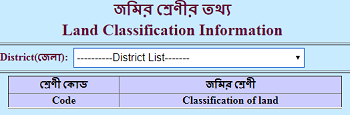
A classification code must be read with the corresponding land-type description in the applicable official reference. It serves a different purpose from a plot number or Khatian number.
- Classification label or code: Describes or represents a land category.
- Plot or Dag number: Identifies the land parcel.
- Khatian number: Identifies the relevant land-record entry.
Check the field heading before interpreting a number. A code copied from an unrelated chart should not be used to determine your property’s classification.
If the official portal provides a classification reference list, match the code with its description there. For an unfamiliar entry, ask the concerned land-record office to explain its meaning in your record.
How to Check Your Plot’s Recorded Land Type
Keep the district, block, mouza and available plot or Khatian reference ready.
- Open the official Banglarbhumi portal.
- Use the Know Your Property or relevant land-record information option available on the current website.
- Follow the access instructions and enter the identifiers requested by the service.
- Confirm that the returned record matches the intended location and parcel.
- Read the land-classification or character-of-land entry, if shown.
For related record-search guidance, see how to check Khatian and plot information.
The portal’s layout and access requirements may change. Follow the current official screen when entering information.
If you find a general Land Classification reference, use it to interpret the category. An area-based reference list does not, by itself, identify the classification of your particular plot.
NIC’s project information describes online RoR and plot-information viewing, along with services for digitally signed copies. If an office or application requires an issued record, check the appropriate service and its requirements. Our guide explains how to request a digitally signed RoR.
Understanding Land-Type Names
Some official documents use Bastu or Vita for a homestead category. Pukur is used for a pond. These examples explain common terminology; they are not a complete list of classifications or numeric codes.
Read the exact wording in your record. A familiar land-type label does not establish that a particular building, business or alteration is approved. Confirm the requirements for your intended activity with the competent authority.
What if the Classification Looks Wrong?
First, make sure you are comparing records for the same land:
- Confirm the district, block and mouza.
- Compare the plot and Khatian references.
- Check whether the documents relate to the same survey or settlement record and date.
- Look for a relevant conversion order or other recorded update, if one exists.
Keep copies of the record and the documents showing the apparent difference. Ask the concerned land-record office which procedure applies to the discrepancy.
A possible recording error and a proposal to use the land differently are separate matters. Explain the issue accurately instead of assuming that every mismatch requires conversion or that every proposed change can be handled as a correction.
When a Change of Use May Need Conversion
Section 4C of the West Bengal Land Reforms Act, 1955 provides a process for seeking permission for changes in land area, character or use. The applicable requirements depend on the land and the proposed change.
Checking a record or submitting an application is not the same as receiving the required order. Before starting work that would change the land’s use, confirm the applicable permissions with the competent authority.
For the related application topic, read our guide to the land conversion process. Follow current official instructions when applying.
A classification guide cannot establish whether a specific plot is eligible for conversion or whether approval will be granted.
Where to Check Land Market Value
For valuation, use the West Bengal Directorate of Registration and Stamp Revenue’s Market Value of Land service.
The published form asks for property details such as location, proposed land use, nature of land and area. This is a separate task from interpreting a classification entry.
The form also directs users to verify the information with the appropriate Registration Office through the proper e-Requisition process.
Prepare the correct property details before making a valuation enquiry. A land-type name alone does not establish the property’s monetary value.
Frequently Asked Questions
Is a land classification code the same as a plot number?
No. A classification code represents a land category in its reference system. A plot number identifies the parcel. Read each number under its correct field heading and location context.
Can I change the classification by editing an online search?
No. A search retrieves information; it does not authorize a change in the record or land use. Contact the concerned authority about the applicable correction or conversion process.
Is a screenshot the same as a digitally signed land record?
No. A screenshot is a visual copy of information displayed on a screen. If an issued RoR or plot-information document is required, use the appropriate official service and check the receiving office’s requirements.
Official References
- Banglarbhumi — official West Bengal land-record portal
- NIC West Bengal — land-record project information
- West Bengal Land Reforms Act, 1955 — India Code
- Directorate of Registration — Market Value of Land
Banglarbhumi.info is an independent information website. For a decision about a particular property, confirm the record and applicable requirements with the concerned authority.