To apply for land conversion on Banglarbhumi, sign in to the official portal and open Citizen Services → Online Application → Conversion Application. Check your land record and proposed use, complete the applicable details, attach the required documents and follow the official fee-payment instructions. Save the application reference for follow-up. Submitting the form or paying a fee does not itself authorise a change in land use; the competent authority must decide the application.
For an overview of property searches, applications and related services, see our Banglarbhumi land records guide. This page explains the land-conversion application process; use the relevant service guide for other tasks.
What is land conversion in West Bengal?
Land conversion concerns permission to change the area, character or use of land. For example, a proposed change from agricultural use to another purpose may require permission. Section 4C of the West Bengal Land Reforms Act, 1955 provides the application and decision framework. The authority may make enquiries, hear interested or affected persons and issue a written order approving or rejecting the request.
An online application is a way to request permission, not a guarantee that the proposed use is allowed. Do not assume that submitting it permits construction or a change of use. Read the written decision and its conditions, and check whether other permissions apply to your project. For a particular property or dispute, seek guidance from the responsible land office or a qualified professional.
Conversion, mutation and Khajna: different purposes
| Service | Purpose |
|---|---|
| Land conversion | Permission concerning a change in the area, character or use of land. |
| Mutation | Updating the recorded ownership or related particulars through the applicable process. |
| Khajna | Payment of assessed land revenue; it does not itself grant conversion permission. |
For a different record-update task, see our Mutation Application guide. If your immediate task is to pay land revenue, use our Khajna Application and Payment guide. This page focuses on applying for land conversion.
Before you start the application
Identify the correct District, Block, Mouza, Khatian and plot references. Check the existing recorded classification, the proposed classification or use, and the exact area for which permission is requested. Keep your contact details and supporting records ready. Our Khatian and Plot Information guide can help with the separate record lookup.
If the record, ownership details or area is disputed or incorrect, get clarification before submitting. Do not guess a land classification or treat the total plot area as the area proposed for conversion without checking your documents.
The application screen includes a separate notice for investors requesting industrial conversion. If that applies to your proposal, follow the current official industrial/investor route indicated on the portal rather than assuming the general citizen form is the correct route for every project.
Documents for a conversion application
The official conversion checklist (PDF) distinguishes core records from documents needed only for particular proposals. Check the current List of Enclosures on the service you are using and any instructions from the authority.
| Document | How to prepare or check it |
|---|---|
| Mutation certificate or current Record of Rights | The published checklist provides these as alternatives. Check that the record identifies the relevant land. |
| Current rent receipt | Keep a clear copy of the relevant land-revenue receipt. |
| Sketch map | Show the plot with side measurements, surroundings and approach road, as required by the checklist. |
| Form 1B affidavit for a compensatory water body | Listed for applications involving land having a water body. This document does not by itself establish that conversion is permissible. |
| West Bengal Pollution Control Board NOC | Applicable where such a certificate is required; not a universal requirement for every application. |
| Competent-authority-vetted Detailed Project Report | Listed for industrial, commercial or housing-complex proposals. Confirm the requirements for your project. |

Use readable, complete files. Check the actual upload field for the permitted format and size; do not reduce a document until important text becomes unreadable. If the portal requests additional authority or representative documents for your applicant type, provide the applicable records. Do not tick a declaration that a document has been supplied when it has not.
How to apply for Banglarbhumi land conversion online
1. Sign in through the official portal. Open banglarbhumi.gov.in and complete the citizen login process. Use the official registration route if an account is needed. Keep account credentials and OTPs private.
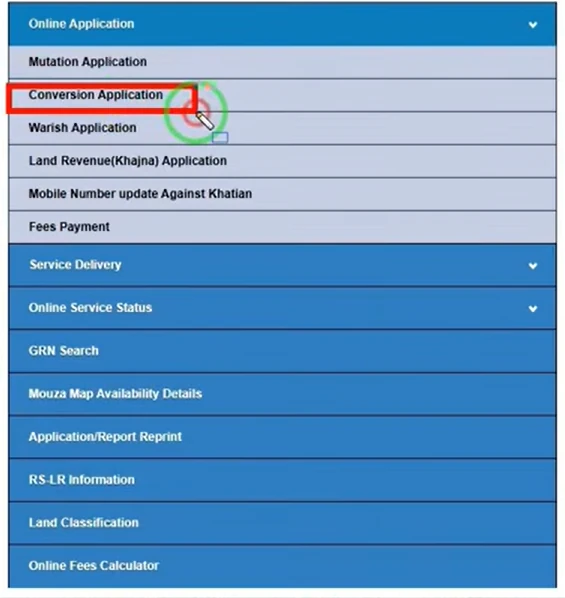
2. Open Conversion Application. Choose Citizen Services → Online Application → Conversion Application. The menu reference below shows the entry.
3. Select the location and review the application tabs. Choose District, Block and Mouza. The application screen shown below contains Particulars of the Applicant, List of Enclosures, Processing Fee Structure and SoP for disposal of Conversion. Read the applicable instructions before completing the form.
4. Enter the applicant details. Select the correct applicant type. The form shows Self, Power of Attorney and Others; select an option only when it accurately describes your role. Enter the relevant Khatian, name, guardian relationship, address and contact information requested by the live form. Follow its required markers and verification instructions.
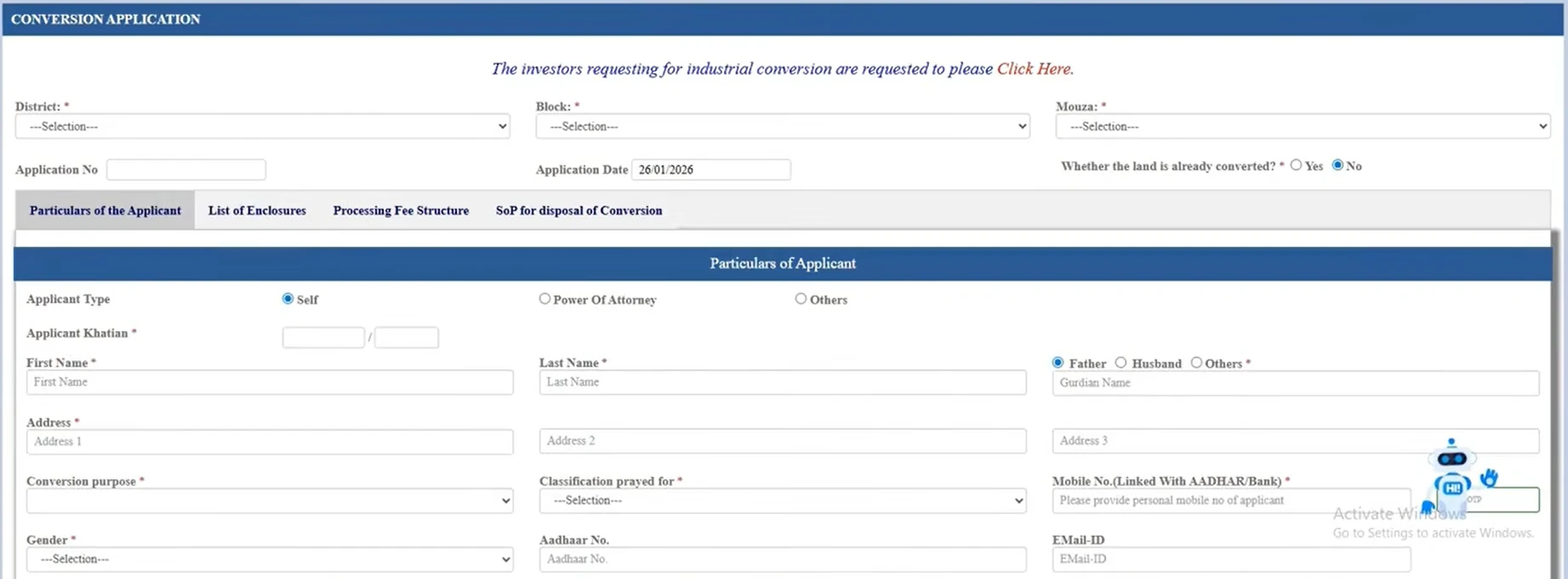
5. Describe the proposed change and land particulars. Distinguish the existing recorded classification from the classification being requested. The “Classification prayed for” field refers to the requested classification, not automatic approval. Choose a conversion purpose that matches your proposal and complete the plot/area details requested on the current form. Check all area units against your records.
6. Answer existing-conversion questions accurately. The form asks whether the land is already converted. Do not change the answer simply to bypass validation. If you are uncertain how an existing use or earlier order affects your application, obtain official guidance.
7. Attach the applicable enclosures and review. Follow the document checklist and upload controls. Verify location, plot, Khatian, area, purpose, requested classification and contact details. Read the declaration, enter the current CAPTCHA and submit when the information is complete.
8. Save the acknowledgement and follow payment instructions. If submission succeeds, save the application number and acknowledgement offered. Complete the official fee-payment step when instructed. Keep the payment reference and receipt separately from the application acknowledgement.
Follow the field labels, document requirements and payment instructions displayed on the official portal for your application.
Conversion fees and payment checks
Read Processing Fee Structure and check the demand shown for your application. Fees can depend on the location, proposed use and other applicable factors; there is no single amount that can safely be applied to every proposal.
Where directed, open Citizen Services → Online Application → Fees Payment, select the relevant Conversion request type and enter the required application details. Confirm the applicant and application before proceeding through the authorised payment flow. Use only payment methods offered there.
Save the application number, GRN if issued and bank transaction reference. A GRN alone is not confirmation of success. If money is debited but confirmation is missing, check the existing transaction before paying again; our GRN Search guide explains the reference-checking task. A fee receipt is not a conversion order.
What happens after submission?
The authority reviews the application and enclosures. It may request corrections or further documents, arrange a field enquiry or inspection, and conduct a hearing before deciding the case. Respond through the official process and keep copies of notices and replies. Do not assume that all steps can be completed without attending an office or hearing.
The official published conversion procedure (PDF) lists a 30-day service timeline. This does not guarantee approval for every application. An application may require clarification, and the decision depends on the case. Follow the current service standard, notices and instructions that apply to your request.
To follow an existing request, use our separate Conversion Application Status guide. Keep the application acknowledgement, conversion Case No. and location details available. Use the reference specifically requested by the status form. If an approval document is issued, obtain it through the official service and check its covered plots, area, permitted use, effective date and conditions.
Common mistakes and how to avoid them
| Issue | Useful next step |
|---|---|
| Wrong Khatian or plot | Recheck the Mouza and record reference; do not submit a neighbouring plot as a substitute. |
| Area or unit mismatch | Compare the requested area with the record and the unit displayed on the form. |
| Unclear purpose or classification | Describe the actual proposed use and seek official clarification if the dropdown options are unclear. |
| NOC or DPR assumed unnecessary | Check the conditional requirements for the particular proposal. |
| Unreadable map or upload | Provide a clear, complete file that meets the current instructions. |
| Payment debited, no confirmation | Preserve references and check status before attempting another payment. |
| Application pending | Check official notices or queries and respond; a payment receipt does not mean approval. |
| Session expires during submission | Check whether an application was created before starting another request. |
Common questions about land conversion
Is land conversion the same as mutation?
No. Conversion concerns the permitted area, character or use of land. Mutation concerns changes to recorded ownership or related particulars.
Is a Pollution Control Board NOC needed for everyone?
No. The official checklist says it applies where the certificate is required. Check the requirements for the proposed activity.
Can I start the new use after paying the fee?
Do not treat payment as permission. Follow the written decision, its effective date and conditions, and obtain other applicable approvals.
Is an online application guaranteed to avoid office visits?
No. Scrutiny, field enquiry, document verification or a hearing may require your participation.
Can I use the same documents for every conversion proposal?
Not necessarily. Core records and conditional project-specific documents are different. Follow the current checklist for your proposal.
Where do I check progress?
Use the official Conversion Status service and the reference requested there. The application guide and status guide cover different tasks.
1 thought on “Banglarbhumi Land Conversion: Application, Documents & Fees”
Comments are closed.