To find Banglarbhumi online application forms, open the official portal, sign in when prompted and select Citizen Services → Online Application. Choose the service matching your task, such as Mutation Application, Conversion Application, Warish Application or Land Revenue (Khajna) Application. For another copy of a submitted form or receipt, use the separate Application/Report Reprint service.
This guide helps you choose between an online application, a document request, a payment-related service and a reprint. Start at the official Banglarbhumi portal. For related land-record searches, visit our Banglarbhumi land records guide.
What does “Banglarbhumi forms” mean?
People searching for Banglarbhumi forms may need different things: a new online application, a blank prescribed document, an application copy or a payment receipt. These are not interchangeable.
| What you need | What to look for |
|---|---|
| Start an application | The relevant service under Online Application. |
| Request a land-record document or map | The appropriate option under Service Delivery. |
| Obtain another copy of a submitted form or receipt | Application/Report Reprint and its available request types. |
| Check an application already submitted | The relevant Online Service Status option. |
| Check a payment reference | The applicable payment-status or GRN Search service. |
| Find a blank prescribed form or declaration | The document linked by the current official service instructions or provided by the responsible authority. |
Opening an online application does not necessarily provide a blank PDF download. Similarly, downloading a document does not submit an application.
How to open online application forms
- Visit the official Banglarbhumi homepage.
- Sign in to your citizen account when required.
- Open Citizen Services.
- Expand Online Application.
- Select the application matching your purpose and read its instructions before entering details.
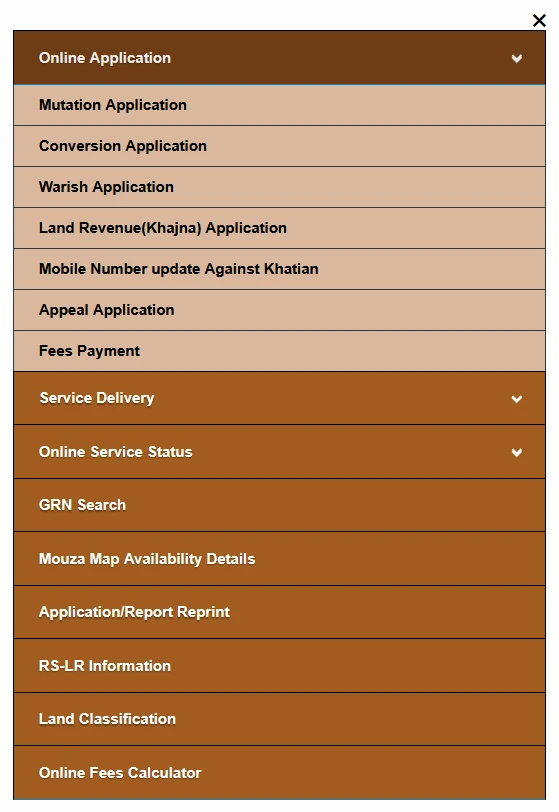
The screenshot shows Mutation, Conversion, Warish, Land Revenue (Khajna), Mobile Number update Against Khatian, Appeal Application and Fees Payment under Online Application. Follow the instructions attached to the specific option you need.
Choose the correct application
| Task | Service and guide |
|---|---|
| Apply for a mutation-related record update | Mutation Application guide. |
| Apply for a proposed change in land character or use | Land Conversion Application guide. |
| Submit an heir-related land-record application | Warish Application guide. |
| Use the land-revenue application service | Land Revenue (Khajna) Application guide. |
| Request a mouza map | Service Delivery → Mouza Map Request. See the Mouza Map Application guide. |
| Request a Record of Rights copy | Service Delivery → ROR Request. See the ROR Request guide. |
Other options shown in the menu have their own purpose and requirements. Do not start an appeal, mobile-number update or payment simply because the option appears beside an application you recognise. For a broader explanation of the groups, read our Citizen Services guide.
Blank PDF forms and supporting declarations
If your application instructions require a prescribed form or declaration, obtain the version linked by the current official service or supplied by the responsible authority. Do not assume that an old PDF found on another website remains suitable for your case.
Before using a downloadable document, check:
- The form title and service it belongs to.
- The issuing department and official source.
- The language and any version or date shown.
- Whether it is a blank application, declaration, sample or instruction sheet.
- The required signatures, attachments and submission instructions.
This guide does not provide an unverified catalogue of direct PDF downloads. Use the current official instructions to confirm which document is accepted and how it must be submitted.
Reprint an existing application or receipt
If you have already applied and need another copy, look for Application/Report Reprint in Citizen Services rather than starting a new application.
Select the appropriate document type from the choices offered and enter the application reference and verification fields requested. Use our Application and Receipt Reprint guide for the related steps.
A reprinted application is not an approval order, and a payment receipt is not the same as the requested land-record document. Check what the retrieved file actually represents.
Fees Payment and GRN Search are separate tasks
Fees Payment appears in the online service menu, but it should not be described as a blank downloadable application form. Use it when the official instructions for your request require the relevant payment.
GRN Search concerns payment-reference checks. It is not a replacement for submitting a land application. For related guidance, read our Banglarbhumi GRN Search guide.
Before paying again after an unclear response, compare the application reference, transaction details and official payment result. Retain the application acknowledgement and payment receipt separately.
Checks before submitting an online form
- Confirm that you opened the correct service.
- Match names and land references to the supporting records.
- Follow the required-field markers and validation messages.
- Check each upload field’s accepted format and size limit.
- Read declarations before accepting them.
- Check the response after submission and save any issued acknowledgement.
Document lists, upload limits, fees and verification steps can differ between applications. Do not copy one service’s requirements into another. If required information is missing, obtain clarification rather than entering invented details.
Common forms and application problems
| Problem | What to do |
|---|---|
| An old form link fails | Return to the official homepage and locate the relevant service. Do not assume an old download address is still valid. |
| Looking for a PDF but an online form opens | Check whether the task requires online submission rather than a blank download. |
| Need another copy after applying | Check the available Application/Report Reprint options before starting a duplicate request. |
| A required PDF will not open | Retry the official link and check the downloaded file. A failed or incomplete download may not be a valid PDF. |
| Upload is rejected | Check the actual field’s format, size and document requirements. Reopen the file to confirm readability. |
| Unsure which version or language to use | Follow the current service instructions or confirm with the responsible authority. |
| Session expires or login is requested | Sign in through the official homepage and reopen the relevant service. |
| Submission outcome is unclear | Check for a confirmation or issued reference before creating another application. |
Frequently asked questions
Are all Banglarbhumi services downloadable PDF forms?
No. The menu contains online applications, document requests, status checks, payments and reprint services.
Does downloading a blank form submit my application?
No. Complete the applicable submission process and check for the acknowledgement issued by the service.
Where can I find Mutation and Conversion applications?
Open Citizen Services → Online Application and select the relevant option.
Should I apply again to obtain a copy of my submitted form?
First check Application/Report Reprint and its available document types. A duplicate application may be unnecessary.
Is GRN Search an application form?
It is a separate payment-reference service, not a new land application.
Can I use any old form downloaded from another website?
Confirm that the responsible authority currently accepts it. Check the official source, form title and submission instructions.
Official portal
Use the official Banglarbhumi website for applications, current instructions and government payments. Banglarbhumi.info is an independent guide and does not accept land applications or issue official documents.