Banglarbhumi RS-LR Plot Information helps you look up the linkage between an older RS plot number and its corresponding LR plot number, or search in the reverse direction. Open RS-LR Information on the official portal, select the correct District, Block and Mouza, choose the search direction, and enter the plot number you already have. This is a plot-number lookup, not a mutation application status check or a Mouza map download.
For an overview of related property searches and applications, see our Banglarbhumi land records guide.
Choose the direction of your search
RS → LR
Have an older RS / Sabek plot number?
Look for the linked LR / Hal plot number.
LR → RS
Have an LR / Hal plot number?
Look for the linked RS / Sabek plot number.
Explanatory illustration, not a portal screenshot. Use the input labels shown on the official form.
What do RS, LR, Sabek Dag and Hal Dag mean?
| Term | Meaning in this lookup |
|---|---|
| RS | Revisional Settlement: the older survey reference used in the RS–LR linkage. |
| LR | Land Reforms: the LR record or plot reference. |
| Dag | A plot number; it is different from a Khatian number. |
| Sabek Dag | The older plot reference. In this RS–LR lookup, it refers to the RS side. |
| Hal Dag | The later plot reference. In this RS–LR lookup, it refers to the LR side. |
Do not identify the survey only from how large or small a number looks. Check the RS/LR label on your document. The same numeric plot number can occur in different Mouzas, so the location selection matters.
Details to keep ready
Keep the District, Block, Mouza and plot number from your land record ready. Also identify whether the number is an RS or LR reference. If your document includes a Mouza code or J.L. number, use it to help distinguish similarly named Mouzas where the portal provides that information. A Khatian number, deed number or mutation case number is not a substitute for the requested plot number.
Which search option should you choose?
| Number you already have | Direction to look for | Number you want to find |
|---|---|---|
| RS / Sabek plot number | Sabek Dag → Hal Dag | Corresponding LR / Hal plot number |
| LR / Hal plot number | Hal Dag → Sabek Dag | Corresponding RS / Sabek plot number |
Read the full option and input label before typing. A label mentioning “LR Plot No.” may describe the number being retrieved rather than the number to enter. Follow the actual form’s instructions; do not select a direction simply because the number you have appears in brackets beside an option.
How to check Banglarbhumi RS-LR Plot Information
1. Open the official portal. Visit banglarbhumi.gov.in. Use the government portal for the search, rather than entering account details on an informational website.
2. Find RS-LR Information. Open Citizen Services and look for RS-LR Information or RS-LR Plot Information. If the portal asks you to sign in, complete its citizen login process and return to the service.
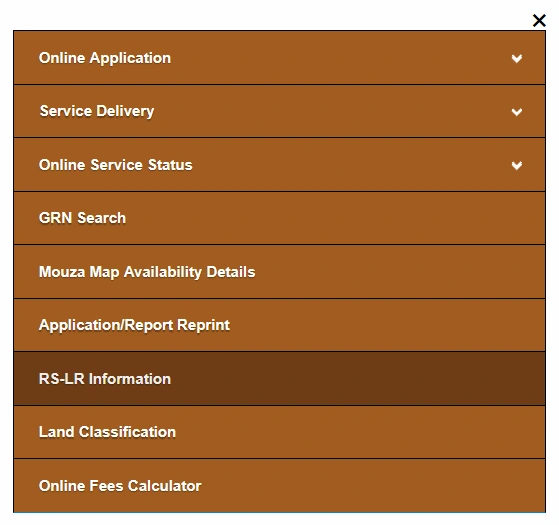
3. Select the location. Choose District, then Block and Mouza. Wait for each list to load. If you change a higher-level selection, check the remaining selections again.
4. Choose the direction. Select the direction that starts with the plot reference you already have, using the table above. Check the input label displayed after making your selection.
5. Enter the plot number. Copy the number carefully from the relevant record. Preserve any suffix or subdivision notation if the form accepts it. Complete the CAPTCHA if one is displayed.
6. Submit and review. Use the search button shown on the form, such as View or Submit. Read the result headings to distinguish the RS and LR columns, and confirm that the selected location is correct.
Check the input label, selected search direction and result column headings before noting the corresponding plot number.
How to read the search result
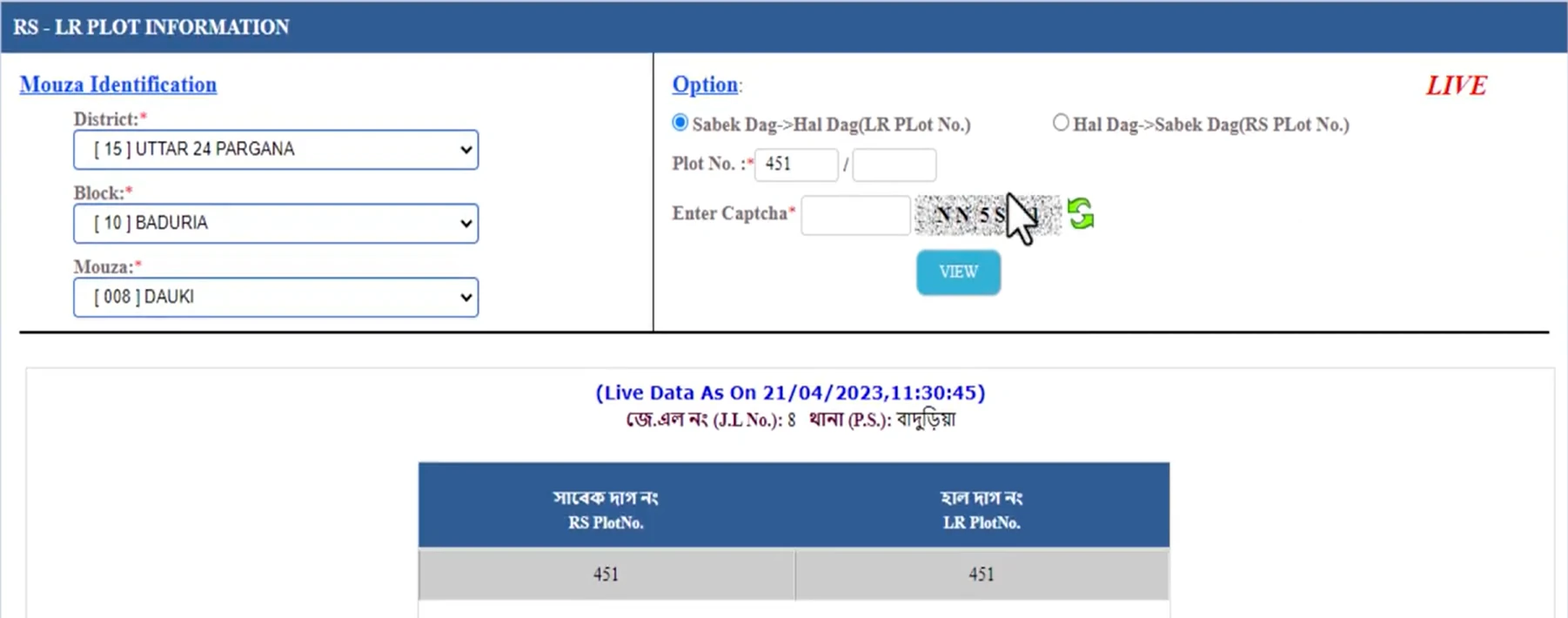
Example shown above: both the RS and LR result columns contain 451. Corresponding numbers do not always have to be different. This older example only explains how to read the columns; do not use its location or plot number for your own search.
Check the location and the number you searched before recording the corresponding number. If the result contains several entries, keep all relevant rows for verification rather than assuming the first row is the only match. Plot correspondence may need to be checked against the relevant records and maps; a displayed linkage alone does not establish ownership, boundaries or the extent of your interest in the land.
If your browser allows printing, you can use Print or Save as PDF for a personal reference. This does not turn a lookup result into a signed or certified record. For an official document, use the applicable record-copy service and check its requirements. Our ROR Request guide explains that separate type of request.
No record found, wrong number or a page error?
| Problem | What to check |
|---|---|
| No matching result | Recheck District, Block, Mouza, survey type and direction. Confirm you used a plot number rather than a Khatian or case number. |
| Number with a slash or suffix is rejected | Check the field instructions. Do not silently remove part of a number and assume the remaining digits identify the same plot. |
| CAPTCHA error | Refresh it if the portal offers that option and enter the newly displayed code. |
| Login prompt or expired session | Sign in again through the official portal, then reopen the service. |
| Dropdown or search does not load | Wait for the current request, then retry later if the portal remains unavailable. Avoid repeated rapid submissions. |
| Records still disagree | Ask the relevant BL&LRO office to help verify the correspondence. Bring the location and the relevant RS/LR record references. |
A missing online result does not by itself prove that the land has no record or that a mutation has been rejected. Do not invent a corresponding plot number or use a neighbouring plot’s result as a replacement.
RS-LR lookup, Khatian search, mutation status and maps
| Your task | Use the relevant service |
|---|---|
| Find the linked RS or LR number | RS-LR Information |
| Look up a Khatian or plot record | Khatian and Plot Information |
| Follow a mutation application | Mutation Status |
| Request a plot map or Mouza map | The separate map request service on the official portal |
| Request a Record of Rights copy | ROR Request |
For an overview of the available tasks, see our Banglarbhumi Citizen Services guide. RS–LR plot correspondence is also different from land-use conversion; this lookup does not change the recorded classification of your land.
Common questions about RS-LR Plot Information
Can I find an LR plot number using an RS number?
That is the purpose of the Sabek-to-Hal direction in this lookup. A result depends on the correspondence available for the selected Mouza and number.
Can I use only a Khatian number?
This service asks for a plot reference. First identify the relevant plot number from your record or use the separate Khatian/Plot Information service.
Does this search download a Mouza map?
No. Plot-number linkage and map requests are separate services. A matching number does not itself provide a map download.
Does a result confirm mutation approval?
No. Use Mutation Status for a mutation application; RS–LR lookup answers a different question.
Are RS and LR numbers always different?
Do not assume they must differ. Read the actual correspondence for the selected record, even if the numbers appear identical.
Banglarbhumi.info is an independent guide website. For official records, unresolved discrepancies and transaction decisions, rely on the responsible government service or office.
Plot maps
Very nice
thank you..
RS.lr.informetion
RS TO LR DAG INFORMATION ………..
I want to inquiry of RS to LR plot number
Rs plot information dite hobe
hai sir, you can visit official website, go to RS plot information link…
RS Porcha khuje pachi na na
RS PORCHA ACHE KINTU LR PORCHA KIBHABE PABO
LR to RS plot no
Check here complete details of BAnglarbhumi LR to RS plat number easy stpes…
RS to lR infromiton
Rs to lr not found see.who are do?