To check Banglarbhumi Mouza Map availability, open Citizen Services on the official portal and select Mouza Map Availability Details. Sign in if prompted. The documented availability flow uses District and Block selections followed by Continue to display mouza-wise map availability. Check the entries for the mouza and map type you need before starting a separate map request.
Use the official Banglarbhumi portal for the search. If you need to apply for a map copy, follow our Mouza Map Application guide. Our Banglarbhumi land records guide explains other searches and services.
What are Mouza Map Availability Details?
Mouza Map Availability Details helps you check the map records listed by the portal for an area. It is useful before requesting a copy because the required map type or sheet may not be available through the online service.
A mouza is a land-record unit. Its cadastral map shows the mapped arrangement of plots and may be divided into multiple sheets. Confirm the correct location and relevant map references rather than choosing a similarly named mouza.
How to check Mouza Map availability on Banglarbhumi
- Visit the official Banglarbhumi website.
- Open Citizen Services. Sign in if the portal asks you to, then return to the service menu.
- Select Mouza Map Availability Details.
- Select the relevant District and Block.
- Use Continue to open the availability information. Follow the current page instructions if its controls have changed.
- Find the required mouza in the returned list and check the available map information, including LR/RS entries and sheet references where provided.
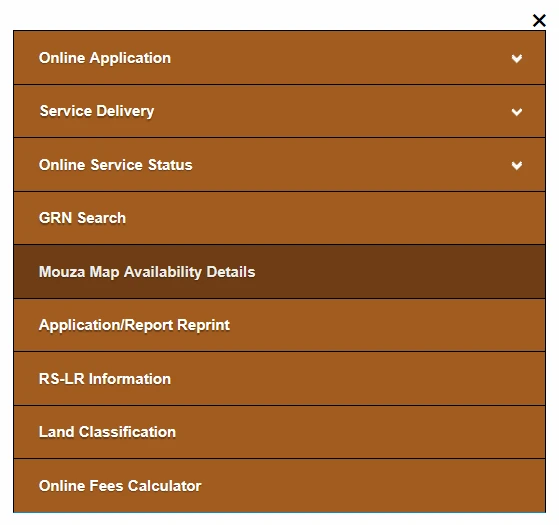
The image above shows the menu location. Availability checking and requesting a map copy are separate tasks; opening this option does not itself submit a map application.
How to read the availability information
Match the returned location and mouza with your land papers. Check the entry for the particular map type you need instead of assuming that availability of one type means every map is available.
| What to check | Why it matters |
|---|---|
| District and Block | Confirm that you searched the correct land-record area. |
| Mouza name and identifying reference | Distinguish the required mouza from similarly named places. |
| LR map entry | Check the availability information for the Land Reforms map record. |
| RS map entry | Check the availability information for the Revisional Settlement map record. |
| Sheet references, where listed | Note which sheets are offered and identify the one relevant to your purpose. |
RS and LR references should not be treated as interchangeable. If your old and current papers contain different plot numbers, use our RS-LR Plot Information guide to understand the related search service.
Availability, map requests and property searches
| Your purpose | Service to look for |
|---|---|
| Check map availability for an area | Mouza Map Availability Details. |
| Apply for a mouza map copy | Service Delivery → Mouza Map Request. |
| Request a plot-specific map | The separate Plot Map Request service. |
| Search Khatian or plot-record information | Know Your Property and its relevant search option. |
If you need textual record details, read our Khatian and Plot Information guide. A Khatian search does not automatically submit a map request.
What to do after checking availability
If the required map is available: note the relevant mouza, map type and sheet references. If you need a copy, proceed through the appropriate request service and confirm the selections before submitting.
Our Mouza Map Application guide explains the request form, applicant details, map selection and payment checks. An availability entry alone is not a completed application, payment confirmation or issued copy.
If the map is not listed or the result is unclear: recheck your selections and record references. Contact the responsible land-record office about access to the required map if it remains unavailable online. A missing online entry does not by itself establish that no map record exists.
Common problems and practical checks
| Problem | What to do |
|---|---|
| Wrong mouza or unexpected entries | Compare the District and Block with your land papers. Check identifying references as well as names. |
| Block list does not load | Allow the District selection to finish loading. Re-select it or reopen the service if necessary. |
| No availability information appears | Recheck the selections and any error message. Do not interpret a blank page as proof that no map exists. |
| Only one map type is listed as available | Check whether that type meets your purpose. Do not assume the other type is also available. |
| Sheet reference is unclear | Use any available official index or seek clarification before requesting an uncertain sheet. |
| Login prompt or expired session | Return to the official homepage, sign in and reopen the availability service. |
| Page error or timeout | Retry through the official homepage and check for service notices. The error alone does not establish map availability. |
Using map information correctly
Read a map with its location, sheet identifiers, scale and legend where provided. A screenshot or resized print should not be used to calculate reliable distances on the ground.
For boundary demarcation, a dispute or a transaction requiring official documents, obtain the appropriate records and guidance from the responsible authority. Map availability does not establish ownership or confirm a current physical-boundary survey.
Frequently asked questions
Where is Mouza Map Availability Details?
It is listed in the Banglarbhumi Citizen Services menu, separately from Mouza Map Request under Service Delivery.
Do I need to submit a map application to check availability?
The availability service and map application are separate. Use the availability option to check the information offered for the selected area.
Does availability mean I can immediately download a certified map?
No. An availability entry does not itself issue a document. Follow the appropriate request and delivery instructions for the copy you need.
Does one sheet cover the entire mouza?
Not necessarily. A mouza may have multiple sheets. Identify the sheet relevant to your area before requesting a copy.
Can I search by a person’s name or postal address?
Do not assume that a name-only or address-only search is available. Follow the location fields offered by the official availability service.
What if the required map is not available online?
Verify the location and map references, then ask the responsible land-record office about access to that record.
Sources and official services
The official Banglarbhumi service menu lists Mouza Map Availability Details and Mouza Map Request separately. The District–Block–Continue sequence is also documented in this independent availability walkthrough. Follow the current official screen instructions if fields or controls differ.
Banglarbhumi.info is an independent information website. Applications, official records and government payments are handled through the relevant government services.
Mouza map
Kanupur mouja acuare dag no
sure.. give details on portal..
How can i check my land information
visit official website, go to khatian and plot information, fill your details and get it….
LR Plot number 564 what is RS Plot Number.
Mouza- Ichapur
Barrackpur1
Majherpara road
these details not here, you should visit banglarbhumi website : http://www.banglarbhumi.gov.in, go to plot information check and fill these details…
How can i see map of a mouza. I dont have details of my plot.
hai sir, without your plot details they cannot do anything here. get EC , to know your land details
How to find land byJL number in Nagrakata
Sir please providwe the. R.S DAG. No …………………… ? and L.R. Dag No – …………………, my clint H.M.C Plot No 186/2, G.T. Road ( North) Salkia,Howrah. please provide the detalied.
sure sir..
How can I see a mouja map with details.
check full details here Banlgarbhumi Mouza map or plot map inforamtion in a simple steps… #mouza map
Andhari mouja map give me
Very slow.
server updation sir..