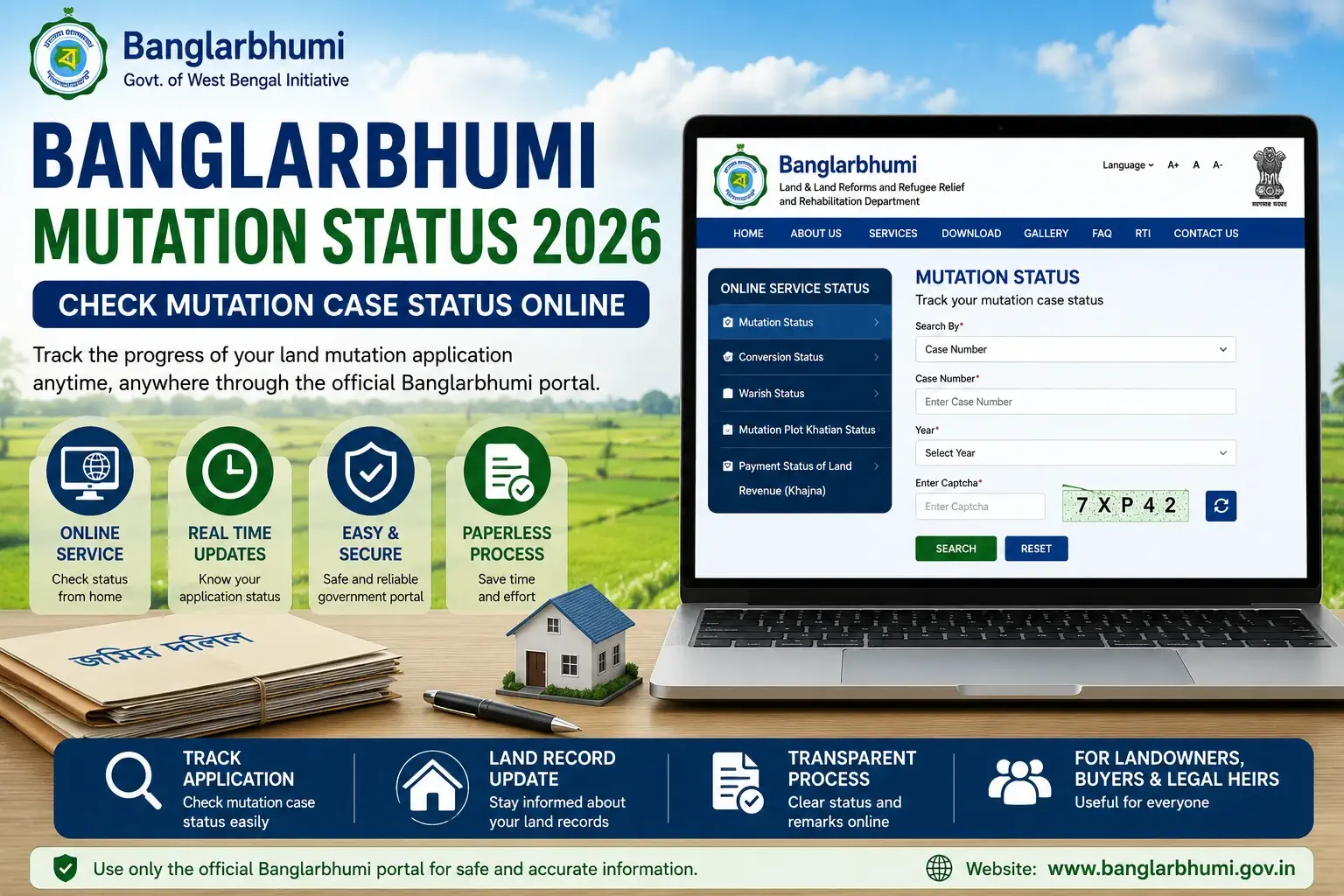
Banglarbhumi Mutation Status is an online service that helps users track the current status of a land mutation application in West Bengal. After applying for mutation, applicants can use the Banglarbhumi portal to check whether their case is pending, under process, approved, rejected, or needs further action from the concerned land office.
In 2026, this service is useful for landowners, property buyers, legal heirs, and applicants who want to know the progress of their mutation case without visiting the land office repeatedly. This guide explains what mutation status means, how to check it online, what details may be required, and what to do if the status is pending or rejected.
What is Banglarbhumi Mutation Status?
Banglarbhumi Mutation Status is a tracking facility available through the Banglarbhumi portal. It allows users to check the progress of a mutation application submitted for land record update in West Bengal.
Mutation is the process of updating land records after ownership transfer. This transfer may happen due to sale, inheritance, gift, partition, court order, or other legal reasons. Once the mutation application is submitted, users can check the case status online to know the latest position of the application.
How to Check Mutation Status Online?
To check Banglarbhumi Mutation Status online, visit the official Banglarbhumi portal, open the Online Service Status or Citizen Services section, select Mutation Status, enter the required details such as case number, deed number, or other reference information, fill in the captcha, and submit the form to view the current status of your mutation case.
What is Land Mutation in West Bengal?
Land mutation is the official process of recording a change in land ownership or landholder details in government land records. When a property is sold, inherited, gifted, partitioned, or transferred legally, the new owner may need to apply for mutation.
Mutation does not create ownership by itself. Instead, it updates the land record based on valid documents and department verification. Therefore, users should keep original documents and legal papers ready before applying for mutation or checking the case status.
Why Mutation Status is Important
Checking mutation status is important because it helps applicants know whether their land record update is moving forward or stuck at any stage. It also helps users identify whether the application is pending, approved, rejected, or waiting for additional verification.
For property buyers, mutation status can help confirm whether ownership details are being updated after purchase. For legal heirs, it can help track inheritance-related record updates. Moreover, it saves time because users can check the progress online before visiting the concerned office.
When Do You Need Mutation?
Mutation may be required in several land transfer situations, such as:
- Sale or purchase of land
- Inheritance after the death of a landholder
- Gift deed
- Partition of family property
- Court order-based transfer
- Ownership correction, where applicable
- Transfer after registered deed execution
However, the exact requirement depends on the land type, document type, and department rules. Therefore, users should follow the official instructions before submitting an application.
Details Required to Check Banglarbhumi Mutation Status
The exact details required may depend on the search option available on the portal. Generally, users may need one or more of the following details:
- Case number
- Application number
- Deed number
- Query number
- District name
- Block name
- Mouza name
- Year of application or deed
- Applicant details, if required
- Captcha code shown on the screen
Before checking the status, keep your application receipt, deed details, and mutation-related documents ready. This will help you enter the correct information.
How to Check Banglarbhumi Mutation Status Online
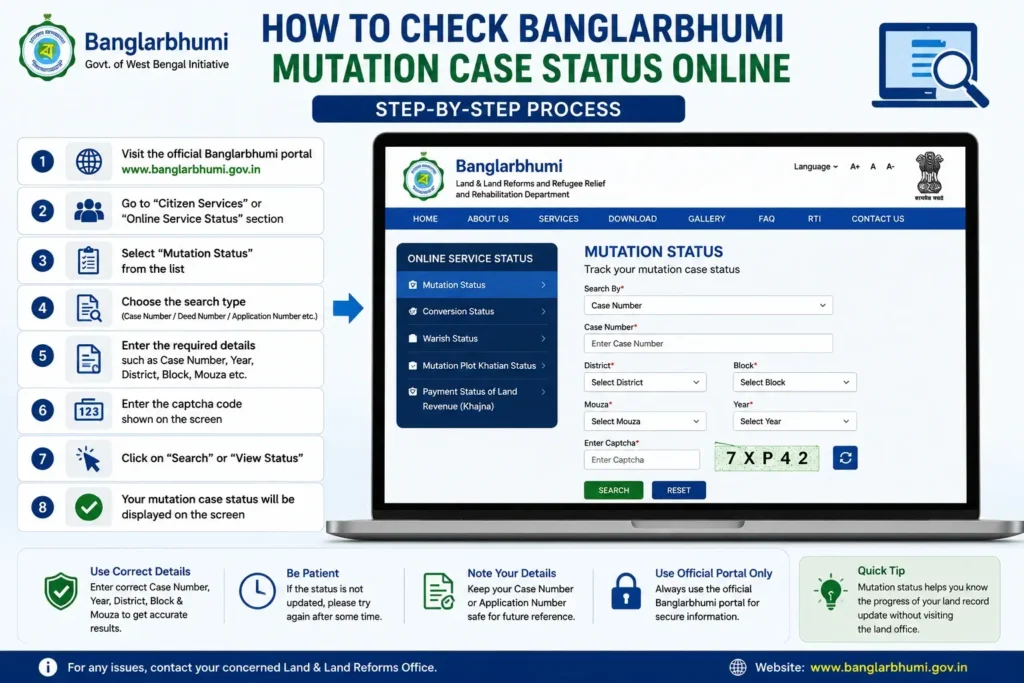
Follow these general steps to check mutation case status online:
- Visit the official Banglarbhumi portal.
- Open the Citizen Services or Online Service Status section.
- Select the Mutation Status option.
- Choose the available search method, if the portal asks.
- Enter the required details such as case number, deed number, or application details.
- Fill in the captcha code correctly.
- Click on submit or view.
- Check the mutation case status shown on the screen.
If the portal does not show any result, recheck the number, year, district, block, and mouza details. A small mistake in the entered details may show no record.
How to Check Mutation Status by Case Number
If you have a mutation case number, you can use it to track the application. This is usually one of the easiest ways to check the status because the case number directly connects with your mutation record.
Enter the case number carefully along with other required details, such as year or location, if asked. After submitting the form, the portal may show the current case stage and available remarks.
How to Check Mutation Status by Deed Details
In some cases, users may search mutation status using deed-related information. This can be helpful when the mutation application is connected with a registered sale deed or transfer document.
Before using this option, keep your deed number, registration year, and related document details ready. If the deed details are entered incorrectly, the portal may not show the expected status.
Banglarbhumi Mutation Plot Khatian Status
Mutation Plot Khatian Status is a related service that may help users understand the mutation-linked plot and khatian update. It can be useful when users want to check whether the land record update is reflected in plot or khatian details.
If mutation is approved but the updated khatian or plot details are not clear, users should verify the record through the available land record search service or contact the concerned land office for confirmation.
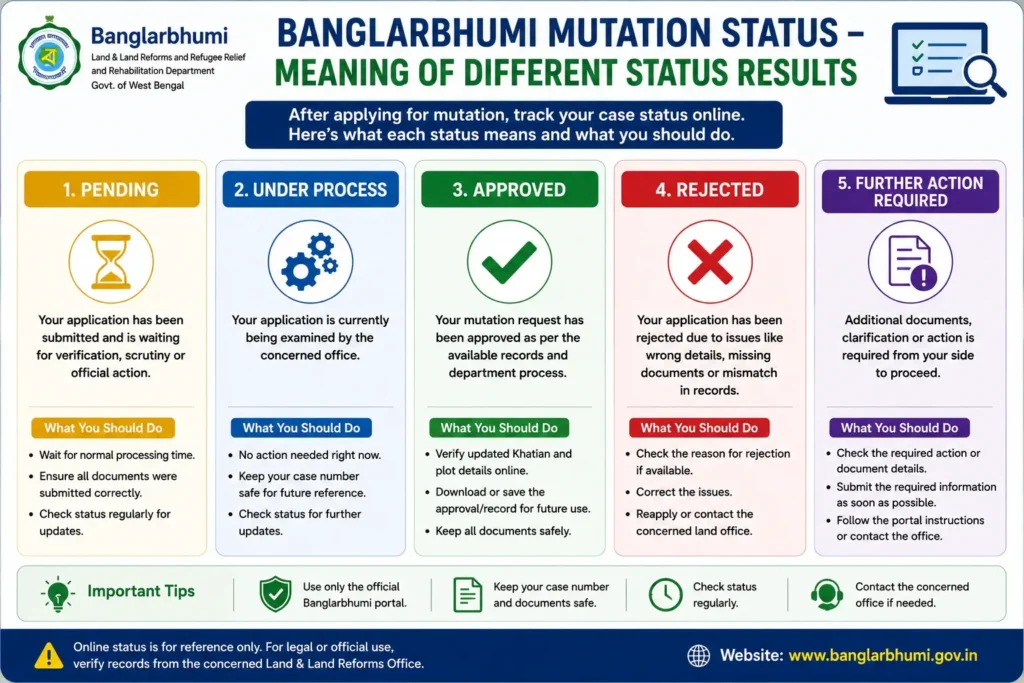
Meaning of Different Mutation Status Results
While checking mutation status, users may see different status messages. The exact wording may vary, but the meaning is usually similar.
1. Pending
Pending means the application is submitted but not yet fully processed. It may be waiting for verification, document checking, or official action.
2. Under Process
Under Process means the application is being reviewed by the concerned office. The department may be checking documents, land details, or field-level records.
3. Approved
Approved means the mutation request has been accepted as per the available record and department process. After approval, users should check whether the updated details are reflected in the land record.
4. Rejected
Rejected means the application was not accepted. This may happen due to incomplete documents, wrong details, mismatch in records, or other official reasons.
5. Further Action Required
This means the user may need to provide additional documents, correct information, or respond to an objection. In such cases, follow the instruction shown on the portal or contact the concerned office.
What to Do if Mutation Status is Pending?
If your mutation status is pending, first wait for the normal processing time as land record verification may take time. Also, check whether the application details and documents were submitted correctly.
If the case remains pending for a long time, note your case number and visit or contact the concerned land office. You may also check whether any objection or document requirement is shown in the portal.
What to Do if Mutation Status is Rejected?
If your mutation application is rejected, read the reason carefully if it is shown online. Rejection may happen because of wrong deed details, missing documents, mismatch in land records, incorrect applicant information, or legal issues.
After understanding the reason, correct the mistake and follow the official process. In some cases, you may need to submit a fresh application or contact the land office for clarification.
What to Do After Mutation is Approved?
After mutation approval, check the updated khatian and plot details through the available land record search option. This helps confirm whether the new details are reflected properly in the record.
You should also keep a copy of the approval, application receipt, and related documents safely. These may be useful for future property verification, tax payment, loan processing, or sale-related work.
Difference Between Mutation Application and Mutation Status
Mutation application is the process of submitting a request to update land records. Mutation status is the tracking option used after submitting the application.
In simple words, first you apply for mutation. Then you check the mutation status to know whether the application is pending, under process, approved, rejected, or needs further action.
Banglarbhumi Mutation Status and Khatian Details
Mutation status and khatian details are closely connected. Mutation status tells you the progress of your ownership update request. Khatian details show the available landholder record.
After mutation is approved, users should check the khatian details to confirm whether the updated landholder information is visible. If the updated record is not visible, wait for the record update or contact the concerned office.
Banglarbhumi Mutation Status and Plot Information
Plot information helps users verify details of a specific land parcel. If mutation is related to a particular plot, users should check whether the plot details match the mutation application.
If there is a mismatch in plot number, mouza, or land area, the mutation process may get delayed. Therefore, before applying or checking the status, verify the plot details carefully.
Banglarbhumi Mutation Status and LR-RS Plot Information
Sometimes old land documents and current records may show different plot references due to settlement changes. In such cases, LR-RS plot information can help users compare old and new plot records.
If your mutation application is connected with old plot numbers, it is better to verify RS-LR or LR-RS details before assuming that the record is wrong.
Common Problems While Checking Mutation Status
Users may face some common issues while checking mutation status online.
1. No Record Found
This can happen if the case number, deed number, year, district, block, or mouza is entered incorrectly. Recheck the details and try again.
2. Captcha Error
Captcha must be entered exactly as shown. If it is unclear, refresh the captcha and submit again.
3. Website Not Loading
Sometimes the portal may load slowly due to high traffic, maintenance, or server issues. Try again after some time.
4. Wrong Search Option Selected
If you have a case number but select deed-wise search, the result may not appear. Choose the correct search method based on the details you have.
5. Application Still Not Updated
Sometimes the status may not update immediately after submission. In such cases, wait and check again later. If the delay continues, contact the concerned office.
Tips Before Checking Mutation Case Status
Before checking the status online, keep these tips in mind:
- Keep your case number or application receipt ready.
- Enter the deed number and year correctly, if using deed details.
- Select district, block, and mouza carefully.
- Use the official Banglarbhumi portal only.
- Do not depend on unofficial websites for payment or sensitive details.
- Save or note down the status for future reference.
- Contact the land office if the status is unclear or pending for too long.
Can Mutation Status Be Checked Without Login?
Some status services may be available without full login, while some may require user login or additional details depending on the portal process. Since portal options may change, users should check the latest availability on the official Banglarbhumi website.
If login is required, use your registered user details carefully. Do not share your password with unknown persons.
Is Banglarbhumi Mutation Status Free?
Checking basic mutation status online is generally available through the portal. However, mutation application, certified documents, land revenue payment, or other related services may involve fees as per government rules.
Before making any payment, users should verify the amount and service details on the official portal.
Safety Note for Property Buyers
If you are buying land, do not rely only on mutation status. You should also verify the registered deed, khatian and plot information, land classification, tax or khajna records, possession details, and legal ownership.
Mutation approval is important, but property verification should be done from multiple records and official sources. For high-value property transactions, legal advice is strongly recommended.
Frequently Asked Questions
Banglarbhumi Mutation Status is an online tracking service used to check the current status of a land mutation application in West Bengal.
You can check it by visiting the Banglarbhumi portal, opening the Mutation Status option under Online Service Status or Citizen Services, entering the required details, completing the captcha, and submitting the form.
You may need details such as case number, application number, deed number, district, block, mouza, year, or other reference information depending on the search option.
Pending means the land office received your mutation application, but officials still need to verify and process it. It may be waiting for document verification or official action.
If the portal rejects your mutation application, first check the reason shown on the screen. Then correct the issue, arrange the required documents, and follow the official process or contact the concerned land office.
Mutation Plot Khatian Status is a related option that helps users check mutation-linked plot and khatian update details where available on the Banglarbhumi portal.
Where the option is available, users may check mutation status using deed-related details such as deed number and year.
No. Mutation status shows the progress of a mutation application, while khatian information shows the available landholder record.
Yes, buyers can check mutation status as part of basic verification. However, they should also verify deed, khatian, plot, tax, and legal ownership records.
Online status is useful for tracking and reference. For legal use or official confirmation, users should rely on certified records or confirmation from the concerned department.
Conclusion
Banglarbhumi Mutation Status is an important online service for tracking land mutation applications in West Bengal. It helps users know whether a mutation case is pending, under process, approved, rejected, or waiting for further action.
For landowners, property buyers, and legal heirs, this service saves time and gives a clear idea of application progress. However, users should enter correct details, use only the official portal, and verify important property matters through official land records and the concerned land department.
I have patta land which has been registered by me on 2016 but mutation is not published.
you should approach registration office,and ask information about mutation information
Mutation status site not open then how to know my mutation status
website is now running sir