To check your Banglarbhumi Warish Application Status, sign in to the official portal and open Citizen Services → Online Service Status → Warish Status. Select the District, Block and Mouza connected with your application, enter the Case No./Application No., type the current CAPTCHA and click Submit. Use the reference from your application acknowledgement; the pictured status form does not offer a Khatian-only or Plot-only search.
Start at the official Banglarbhumi portal. For other land-record searches and services, visit our Banglarbhumi land records guide. Banglarbhumi.info provides independent guidance and does not process applications or decide their status.
Details needed to check Warish Application Status
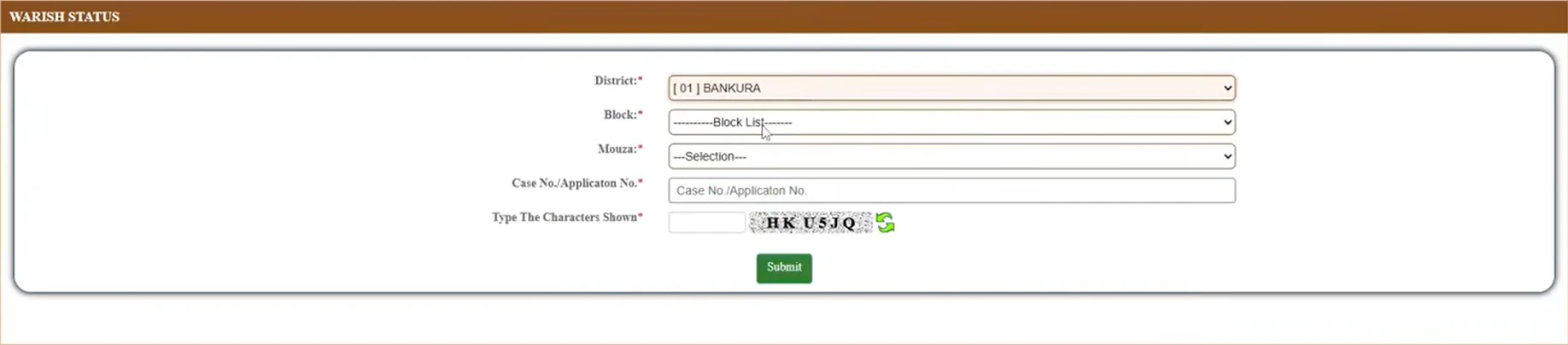
Keep your saved application copy or acknowledgement ready. The Warish Status form shown below asks for the following information:
| Field | What to enter |
|---|---|
| District | The district associated with the land and your application. |
| Block | The relevant block within the selected district. |
| Mouza | The mouza connected with the application. |
| Case No./Application No. | The relevant reference from your application papers. Copy its letters, numbers and separators carefully. |
| Type The Characters Shown | The CAPTCHA displayed in your current session. |
A Khatian number, plot number, GRN and application number serve different purposes. Do not substitute one for another. If you have not applied yet, follow the Warish Application steps and document guide.
How to check Banglarbhumi Warish Application Status
1. Open the official portal and sign in. Visit banglarbhumi.gov.in and use your citizen account. If the portal asks you to log in before opening Citizen Services, complete that step and return to the service menu.
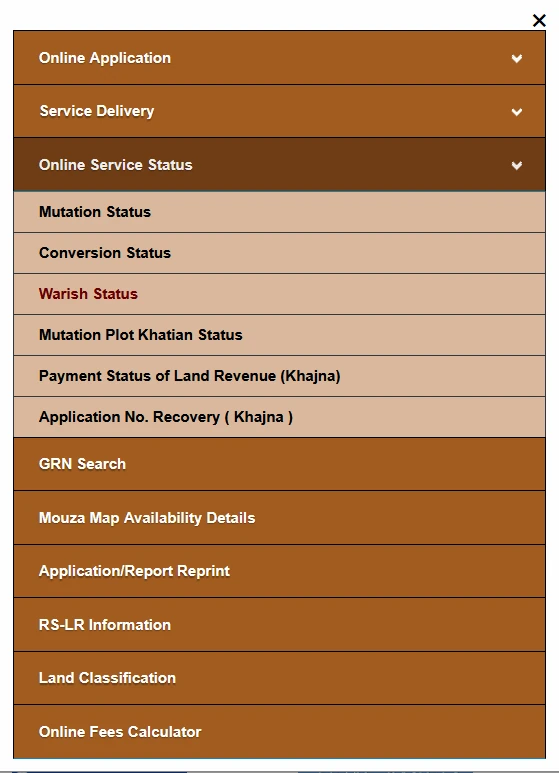
2. Open Warish Status. Select Citizen Services, expand Online Service Status and choose Warish Status. Choose this status service when tracking a submitted request; Warish Application under Online Application opens the application service.
3. Select District, Block and Mouza. Choose the location in this order and allow each dependent list to load. Match the selections to your application papers. If you change the District or Block, check the later selections again.
4. Enter the Case No./Application No. Copy the relevant reference into the field with this label. Check for missing prefixes, spaces added during copying and characters that look similar, such as the letter O and the number 0. Do not shorten the reference or invent a replacement number.
5. Enter the CAPTCHA and click Submit. Type the characters currently displayed beside the input box. If they are unclear, use the refresh icon and enter the new characters. The CAPTCHA in the example image is only part of that captured session and will not work for your search.
6. Read the response for your application. Check that any returned reference and location match your papers. Read the displayed status, remarks and any linked notice or order before deciding the next action. If printing or downloading is offered, save a copy for your records.
Where to find your Case Number or Application Number
Check the acknowledgement, saved application PDF, printed application copy or official communication issued for your request. Look for the exact labels Application No. and Case No. Keep both references where available rather than assuming they are identical.
If you cannot find the number, first check your downloads and saved application papers. If necessary, contact the office handling the request with the applicant details, land location and any acknowledgement you still have. The pictured Warish Status form does not show a search using only a person’s name, Khatian number or plot number.
The menu option Application No. Recovery (Khajna) belongs to the Khajna service. Do not treat it as a recovery facility for Warish applications.
How to reprint a Warish Application copy
The Application/Report Reprint service includes a Warish Application Form option. This is useful when you know your application number and need another copy of the submitted form.
- Open Citizen Services and select Application/Report Reprint.
- In the Type list, choose Warish Application Form.
- Enter the Application No. and the CAPTCHA requested on that page.
- Follow the page’s controls to retrieve the matching form and use the available print or download option.

A reprinted application confirms the contents of that form; it is not an approval order. This service also requires an application number, so it should not be presented as a number-recovery method. See our Application and Receipt Reprint guide for related reprint options.
What to do after checking the status
Use the actual remarks or notice attached to your request. A short status label alone may not explain a delay, the reason for a decision or the documents required next.
| If the response indicates | Practical next action |
|---|---|
| The request is still being processed | Check for remarks, notices or a stated next action. Keep the reference available for enquiries. |
| Additional information or attendance is required | Read the exact document, deadline and submission or attendance instructions. Follow the specified route. |
| A decision has been issued | Read the order and its conditions. Check what further action, if any, it requires. |
| The request has been rejected | Read the stated reasons and available correction or review instructions. Do not assume that starting a duplicate application is the correct remedy. |
| No matching record is returned | Recheck the location and reference before contacting the responsible office. |
These are action guidelines, not a list of guaranteed portal status labels. Follow the wording and instructions displayed for your own case.
Common Warish Status search problems
| Problem | What to check |
|---|---|
| Block or Mouza list does not load | Wait for the previous selection to load. Re-select the location if needed, or reopen the service after signing in again. |
| Invalid CAPTCHA | Refresh the CAPTCHA and type the new characters. Do not reuse characters from an earlier attempt. |
| No record found | Compare District, Block, Mouza and the complete reference with your application papers. A failed search does not by itself prove rejection. |
| Application number is missing | Check saved PDFs, acknowledgements and official communications. Seek help from the handling office if the reference remains unavailable. |
| Login prompt or expired session | Return to the official homepage, sign in again and reopen Warish Status through Citizen Services. |
| Status has not changed | Check notices and remarks. Do not assume document problems or rejection solely from an unchanged status. |
| A different application’s details appear | Recheck the reference and location. Do not rely on another person’s result. |
| Page error or blank response | Note the error and retry through the official homepage. Avoid creating a new application merely because a status lookup failed. |
Warish Status and Mutation Status are different services
Choose the status service that matches your official application or case papers. Do not assume that a Warish request automatically becomes a mutation case because the status has not changed.
If the department has issued a separate mutation reference or instructed you to check a mutation case, follow the Mutation Status guide. A record-update application or status message should not be treated as an automatic determination of ownership or inheritance entitlement.
Where an official decision requires a land-record check, use the Khatian and Plot Information guide. Check the relevant record rather than assuming that submitting a form immediately changes it.
Processing time and help with a pending request
Do not rely on an unsupported promise of approval within 30–90 days. Check any applicable official service timeline, acknowledgement and case notice. An online tracking facility does not remove the need to attend verification or contact an office when instructed.
For an enquiry, keep the Case No./Application No., District, Block, Mouza, acknowledgement and exact issue ready. Use contact details published on the official portal or in your case papers. Share personal documents through the official channel requested, rather than posting them in public comments.
Frequently asked questions
Can I check Warish Status with only a Khatian or plot number?
The pictured form asks for District, Block, Mouza, Case No./Application No. and CAPTCHA. It does not show a Khatian-only or Plot-only search.
Which district should I select?
Select the district associated with the land and application. Do not copy Bankura from the example unless it is the correct district for your request.
Does “no record found” mean my application was rejected?
No. First check the location, reference and service selected. A search failure alone does not establish the application’s decision.
Can I recover my Warish application number through reprint?
The pictured reprint service itself asks for an Application No. Check your saved acknowledgement or seek assistance from the handling office if the number is lost.
Is a Warish Application PDF proof of approval?
No. An application copy and an approval or decision order serve different purposes. Read the official decision for the outcome.
Should I apply again if the status is pending?
Do not create a duplicate request just because the status is unchanged. Read the remarks and obtain clarification about the existing application first.
Official service reference
The official Banglarbhumi service menu lists Warish Status under Online Service Status and provides the Application/Report Reprint service. Use the official portal for your actual lookup, current instructions and case-specific notices.