To check a Banglarbhumi mutation hearing notice, visit the official Banglarbhumi portal and check your mutation case details. If the result shows “Notice for Hearing generated”, review the hearing venue, date and time, and open the available PDF document for the instructions relating to your case. A hearing notice is a step in the mutation process; it is not confirmation that your mutation has been approved.
This guide explains how to check mutation notice information, understand the hearing details and prepare for the next step. For an overview of other portal services, see our Banglarbhumi land records guide.
What Is a Banglarbhumi Mutation Notice?
A mutation notice communicates information about proceedings relating to a mutation application. A hearing notice may ask the applicant or other interested parties to appear before the concerned land records authority on a specified date, provide documents or respond to matters mentioned in the notice.
Read the notice issued for your own case carefully. The case reference, issuing office, hearing arrangements and instructions in that document determine what you need to do next.
| Document or information | What it tells you |
|---|---|
| Application acknowledgement | Records the submission of an application and provides its reference details. |
| Mutation status | Shows the stage or action recorded against a mutation case. |
| Hearing notice | Provides hearing information and instructions for the concerned parties. |
| Mutation order | Records the decision made by the competent authority. Read the order to understand the outcome. |
What Does “30 Days Notice Mutation Case” Mean?
People also search for mutation notices using the phrase “30 Days Notice Mutation Case”. However, you should not assume that every mutation case has the same notice period, that your hearing will take place after exactly 30 days, or that mutation will be approved automatically after that period.
Follow the dates and instructions stated in your actual notice. If you are unsure about a response deadline or hearing date, contact the issuing office promptly rather than calculating a deadline from an online article.
Details to Keep Ready Before Checking
- Your mutation case number, as recorded on the acknowledgement or previous correspondence.
- The district, block and mouza relating to the land.
- Your deed number and deed year, if using a deed-based search.
- The application acknowledgement and any earlier notice or payment receipt.
- Your official portal login details, if the service asks you to sign in.
Use the reference requested by the selected search option. A payment reference, application number and mutation case number should not be treated as interchangeable.
How to Check Banglarbhumi Mutation Hearing Details
- Open the official Banglarbhumi portal.
- Open Citizen Services, expand Online Service Status and select Mutation Status. Sign in if prompted.
- Select the search method for which you have the required information. For a case-based lookup, choose Case Wise Search.
- Select the correct District, Block and Mouza.
- Enter your Case No. carefully, following the reference recorded on your documents.
- Enter the characters currently shown in the CAPTCHA. Use the refresh option if they are difficult to read.
- Select Submit and review the matching case details.
- If the result shows hearing information, check the Status, Venue and Date & Time. Open the PDF download option where available and read the document.
For more information about the search process, read our Banglarbhumi Mutation Status guide. The National Informatics Centre’s West Bengal project description also states that mutation notices can be downloaded using a deed number or mutation case number.
“Notice for Hearing Generated”: What Should You Do?
This status means that a hearing notice has been generated against the case. Review the hearing information and read the available notice to find out who needs to attend, where to appear and which documents or explanations are requested.
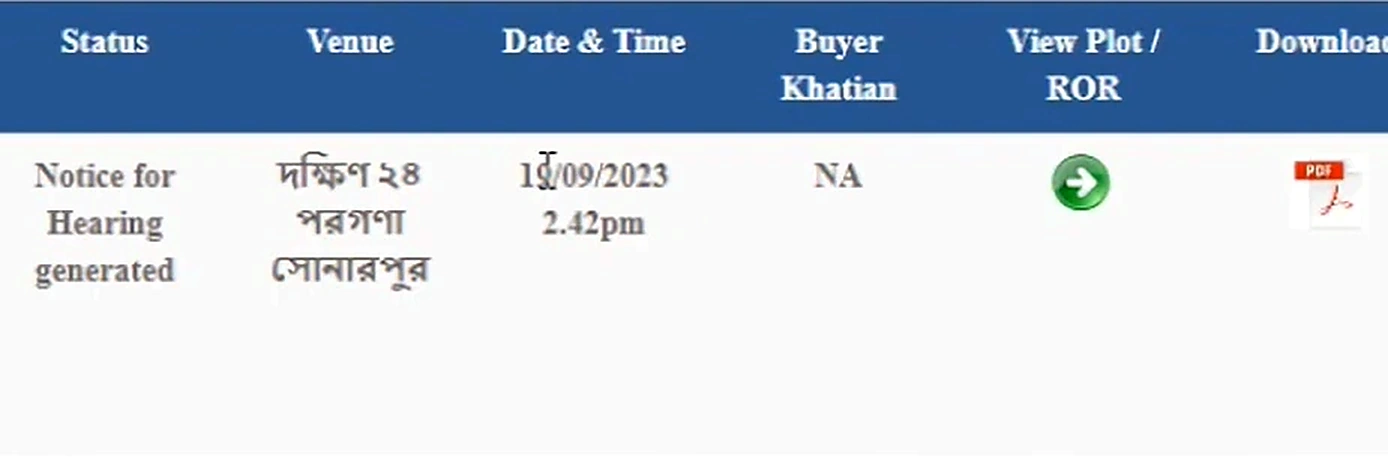
The example above is a status result, not the hearing-notice document itself. Check the details displayed for your own case and read the downloaded document before taking action. A generated hearing notice does not establish that the mutation has been approved.
What to Check in Your Hearing Notice
- Case reference: Check that the notice relates to your mutation case.
- Names of the parties: Review the applicant and other parties mentioned.
- Land details: Check the mouza, khatian, plot and other identifying information recorded in the document.
- Issuing authority: Identify the office that issued the notice.
- Hearing arrangements: Note the date, time, venue and any attendance instructions.
- Documents requested: Prepare the records specifically mentioned in the notice.
- Response instructions: Read any directions about submitting an explanation, objection or supporting documents.
If you find a mismatch in the case reference, party names or land details, contact the issuing office with your acknowledgement and supporting records. Do not alter the downloaded notice.
How to Prepare for the Mutation Hearing
Start with the document requirements written in your notice. Depending on the case, relevant records may include the application acknowledgement, registered deed or inheritance documents, previous land records, payment receipts and identity documents. This is a preparation checklist; the issuing authority may require different or additional records.
- Save the notice and keep a readable printed copy if needed for the hearing.
- Arrange the requested documents, including originals and copies where instructed.
- Check the hearing venue and make arrangements to attend at the stated time.
- If you cannot attend or the hearing date has already passed, contact the issuing office promptly for directions.
- Keep copies of any documents or written responses you submit and retain the acknowledgement, where provided.
- After the hearing, check your case status and read any order or further notice issued.
If you need to review the application process, see our Banglarbhumi Mutation Application guide. You can also use our Khatian and Plot Information guide to understand how to check the corresponding online land records.
Common Problems While Checking a Mutation Notice
No matching case is displayed
Recheck the district, block, mouza and case number against your acknowledgement. Make sure you have chosen the appropriate search method. A missing result alone does not establish that the application was rejected. If the details are correct and the problem continues, contact the concerned land records office.
The PDF does not open
Check whether your browser blocked a new tab or download from the official portal. Retry after the page finishes loading, check your downloads folder, or try another updated browser. If the document remains unavailable, contact the issuing office with your case reference.
The CAPTCHA is rejected
Refresh the CAPTCHA and enter the newly displayed characters. Do not copy the CAPTCHA from a tutorial screenshot, because it belongs to a different session.
The notice and status page show different hearing details
Check for a later notice or communication and ask the issuing office to confirm the applicable hearing arrangements. Keep copies of both records so you can explain the difference clearly.
Frequently Asked Questions
Does “Notice for Hearing generated” mean mutation is approved?
No. It indicates that a hearing notice has been generated. Check the subsequent case proceedings and the authority’s order to understand the outcome.
Will mutation be approved automatically after 30 days?
Do not assume automatic approval after 30 days. Follow the notice issued for your case and check the decision recorded by the competent authority.
Can I check notice information using a deed number?
NIC’s West Bengal project description identifies deed number and mutation case number as references for downloading mutation notices. Use the relevant search option available on the official portal and provide the details it requests.
Is the status screenshot a substitute for the hearing notice?
No. The status result can show hearing information, but you should read the actual notice for its instructions and document requirements.
What should I do if I missed the hearing?
Contact the issuing office promptly with your case number and notice. Ask about the current proceedings and the next action required. Do not assume that another hearing has been scheduled.
Official Sources and Help
- Banglarbhumi official portal — check your case and available documents.
- NIC West Bengal project information — describes Banglarbhumi’s mutation notice and case-status facilities.
Banglarbhumi.info is an independent informational website. For case-specific hearing instructions, corrections or decisions, contact the authority identified in your notice.